Station1 Web Design & Hosting

Instructions for: Outlook | [Netscape Mail] | Eudora Light


Installing Netscape Mail
  1. Open Netscape Navigator.
  2. From the menu bar, click Optionsand select Mail and News Preferences.
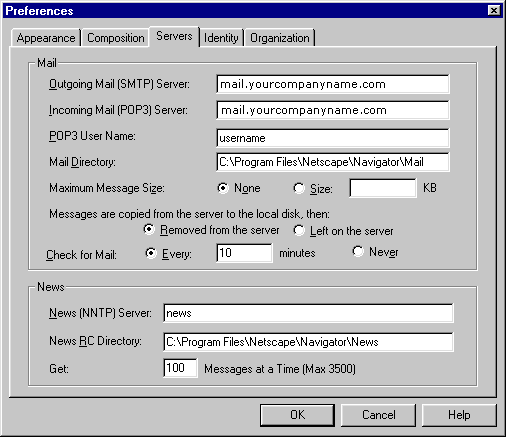
  3. Click the Servers tab.
  4. In the Outgoing Mail (SMTP) Server text box, enter mail.yourcompanyname.com
  5. In the Incoming Mail (POP3) Server text box, enter mail.yourcompanyname.com
  6. In the POP3 User Name text box, enter your username (without ELN/ prefix.)

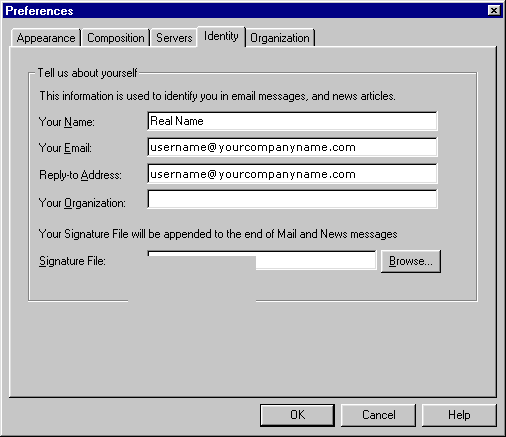
  7. Click the Identity tab.
  8. In the Your Name text box, enter your name.
  9. In the Your e-mail text box, enter: username@yourcompanyname.com
  10. In the reply-to-address text box, enter your e-mail address: username@yourcompanyname.com

  11. Click the OK button.
  12. From the menu bar, click Window and select Netscape Mail.
  13. Enter your password and click OK.
  14. Click File.
  15. Click Get New Mail.

Return to Customer Service Options  


Home
  | 
Web Design  |  Web Hosting  |  E-Commerce  |  Customer Service
 
About Station 1  | Contact Us